
AI tools like ChatGPT, Gemini and Claude are surprisingly good at the hardest part of any cabinetry project: working out what you actually want. Here's how to use them to come up with ideas, see those ideas in your own home, and turn them into a plan you can bring to Cutshop®.
Most cabinetry projects start with a problem that needs fixing. You know the space isn't working either aesthetically or functionally. You just don't yet know what would fix it.
This stage used to mean hours on Pinterest and a sketch you weren't confident in. Now there's another way through it. AI tools like ChatGPT, Gemini and Claude are free, available at 10pm on the couch, and never get sick of you asking "but what if the drawers were deeper?"
Used well, they make a very useful planning partner. They can help you brainstorm, show you a design in your actual room, and draft a materials list.
Here's how to use AI at each stage of the planning process, where to trust it, where not to, and how to bring what it gives you into Cutshop® to turn into the real thing.
Start with the problem, not the cabinet
The most common mistake is asking AI for a cabinet. "Design me a wardrobe" gets you a generic wardrobe. Describing what's going wrong gets you something far more useful.
Tell it what the space is, who uses it, and what annoys you about it. The school bags piled by the front door. The corner cabinet jutting out a bit too far. The TV, the router and three remotes fighting over one small side table. Add the rough size of the space, your budget, and whether you'll be assembling it yourself.
Then ask it to interview you before it suggests anything. A good AI tool will come back with questions you hadn't thought to ask: does a door swing into the space, do you want it to reach the ceiling, will kids be using the bottom drawers?
Don't be surprised if it suggests something you hadn't considered. Some of the more unique projects, like the charging drawer, the pet feeding nook or the window seat library, are exactly the kind of idea that comes from describing a problem instead of a product.
Try this prompt:
“I want to add custom cabinetry to my [room]. The space is roughly [size]. The problem I’m trying to solve is [describe it]. I’ll be assembling it myself from pre-cut panels. Before you suggest anything, ask me 5 questions about how I use this space. Then give me three design ideas, from simplest to most ambitious.”
Show it the room
Most AI tools can now look at a photo, and this is where they go from generic to useful. A photo of your actual hallway gets you ideas that are designed specifically for you.
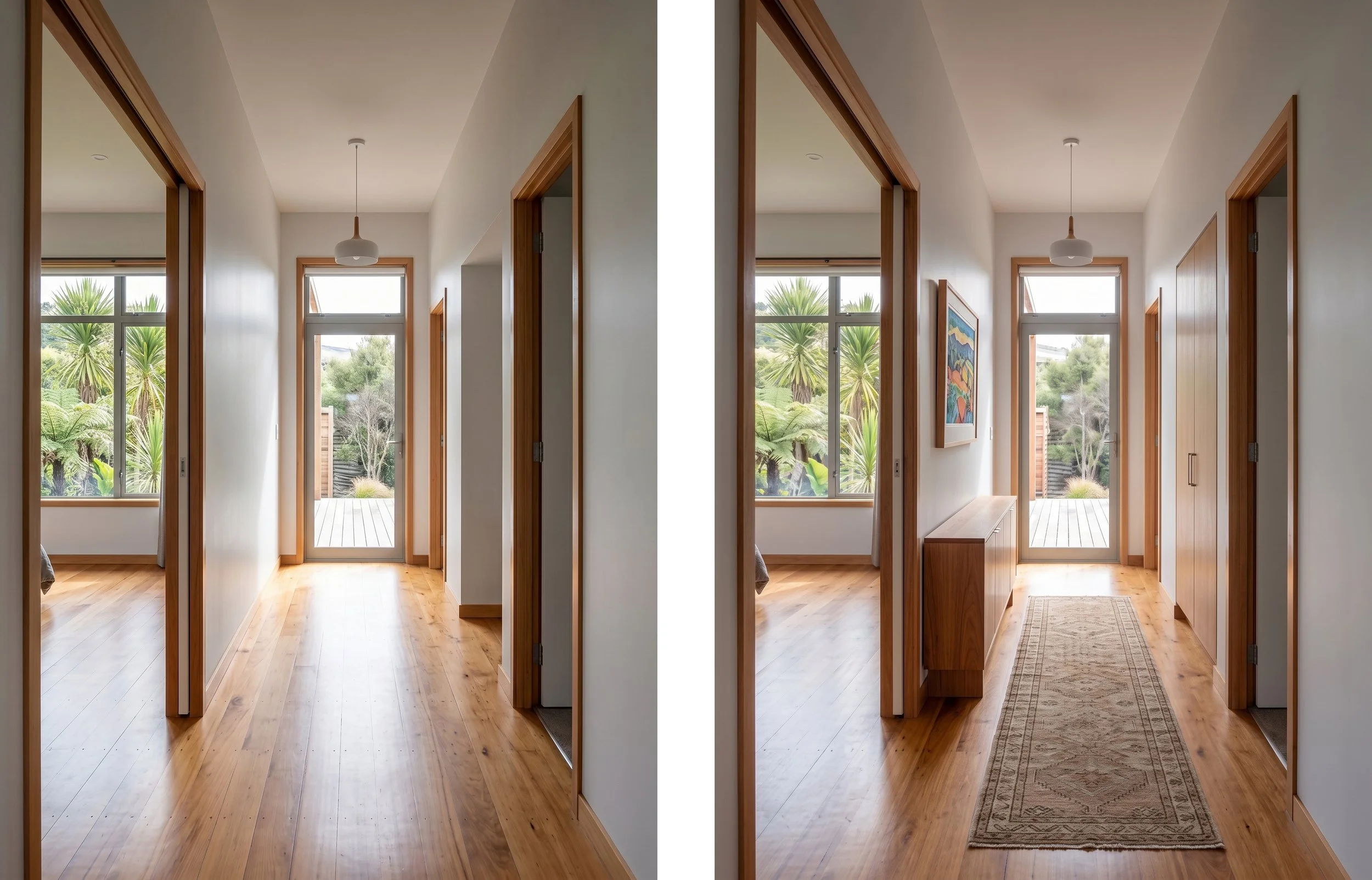
Take the same photos we'd ask you to bring into a factory: a wide shot from across the room, a straight-on shot of the wall, and close-ups of anything awkward, like skirting, power points, a window reveal or a heat pump. Then ask it what would get in the way. It will often pick up on things you've stopped noticing.
The one thing a photo can't do is measure. AI is poor at judging size from an image, so type your measurements into the message rather than letting it guess. And crop out anything you wouldn't post publicly, like mail on the bench or your house number.
Try this prompt:
“Here are three photos of a wall in my [room]. It’s [W]mm wide and [H]mm high, and I can go [D]mm deep before I hit the walkway. Point out anything the cabinetry will need to work around, then suggest two layouts that would suit this space.”
See it in your own home before you build it
This is the fun part. Image tools like Gemini and ChatGPT can take a photo of your room and add cabinetry to it, so you can see a floor-to-ceiling wardrobe or a media wall in your own space instead of someone else's show home.
It's the cheapest way to test the ideas you're unsure about. Will a deep green work against your timber floor? Will open shelving look curated or cluttered? Generate three versions, put them side by side, show your partner, change your mind. It costs nothing.
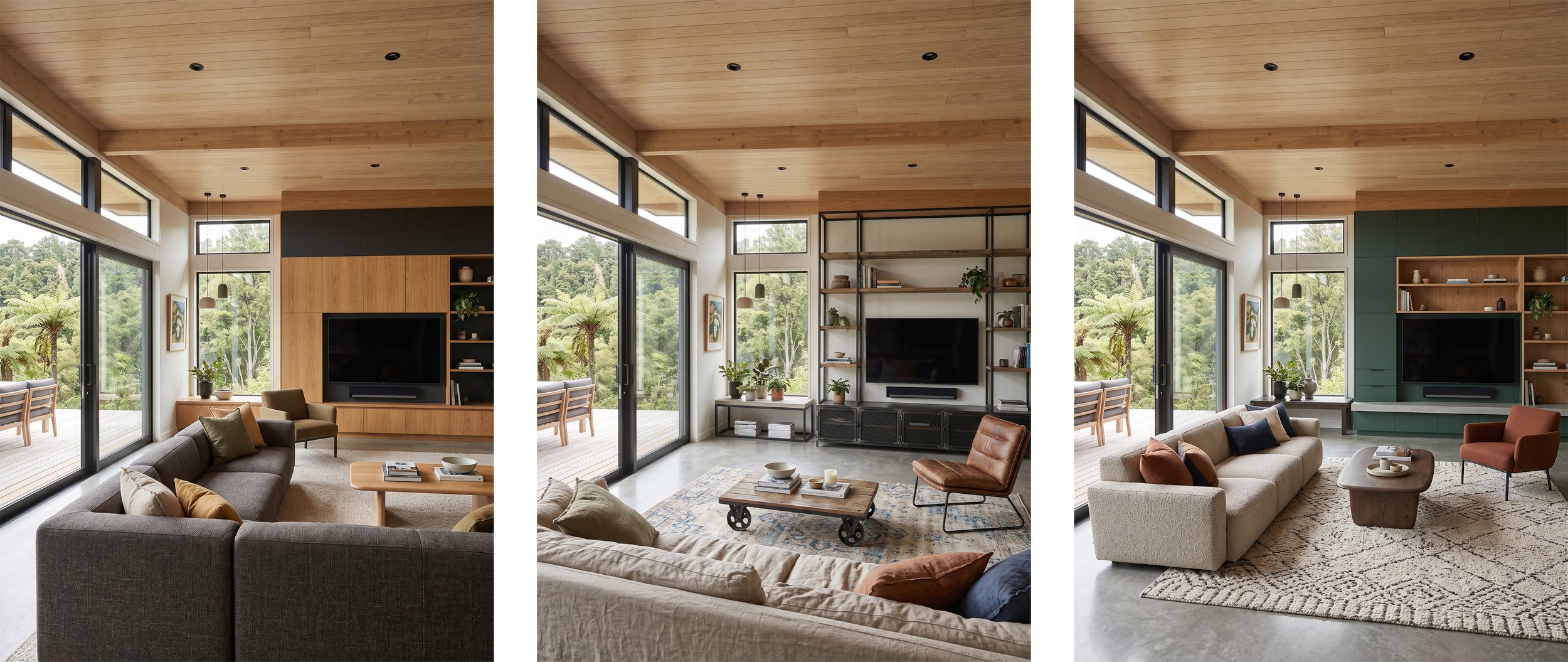
A few things make the results noticeably better:
Be specific about the finish. "Matte white" and "warm oak woodgrain" get much closer results than "nice cabinets".
Tell it what to leave alone. Ask it to keep the walls, floor, windows and lighting exactly as they are, or it'll redecorate the whole room while it's at it.
Change one thing at a time. Same layout in a different colour, or the same colour in a different layout.
Then treat the result as a mood board, not a drawing. AI images aren't to scale. They'll widen a wall, move a window, or add a drawer where there isn't room for it to open. Colours on a screen never quite match a real board, either. Use mockups to choose a direction, then come in and hold the actual samples up against each other.
Try this prompt:
“Using this photo, add floor-to-ceiling cabinetry along the back wall with flat matte white doors, an open shelving section on the right in a light oak finish, and no visible handles. Keep the walls, floor, window, ceiling and lighting exactly as they are.”
Turn the idea into a plan and a materials list
Once you've settled on a design, AI can help you work out what it's made of.
Give it everything in millimetres: height at both ends, width in three places, depth, and anything on the wall it has to work around. Tell it which board thickness you'll be using (ask us if you're not sure). Then ask for every panel with its dimensions and quantity, plus the hardware: hinges, drawer runners, shelf supports and handles. While you're there, ask for a simple front-on drawing with the dimensions marked, the assembly order, and a tools list.
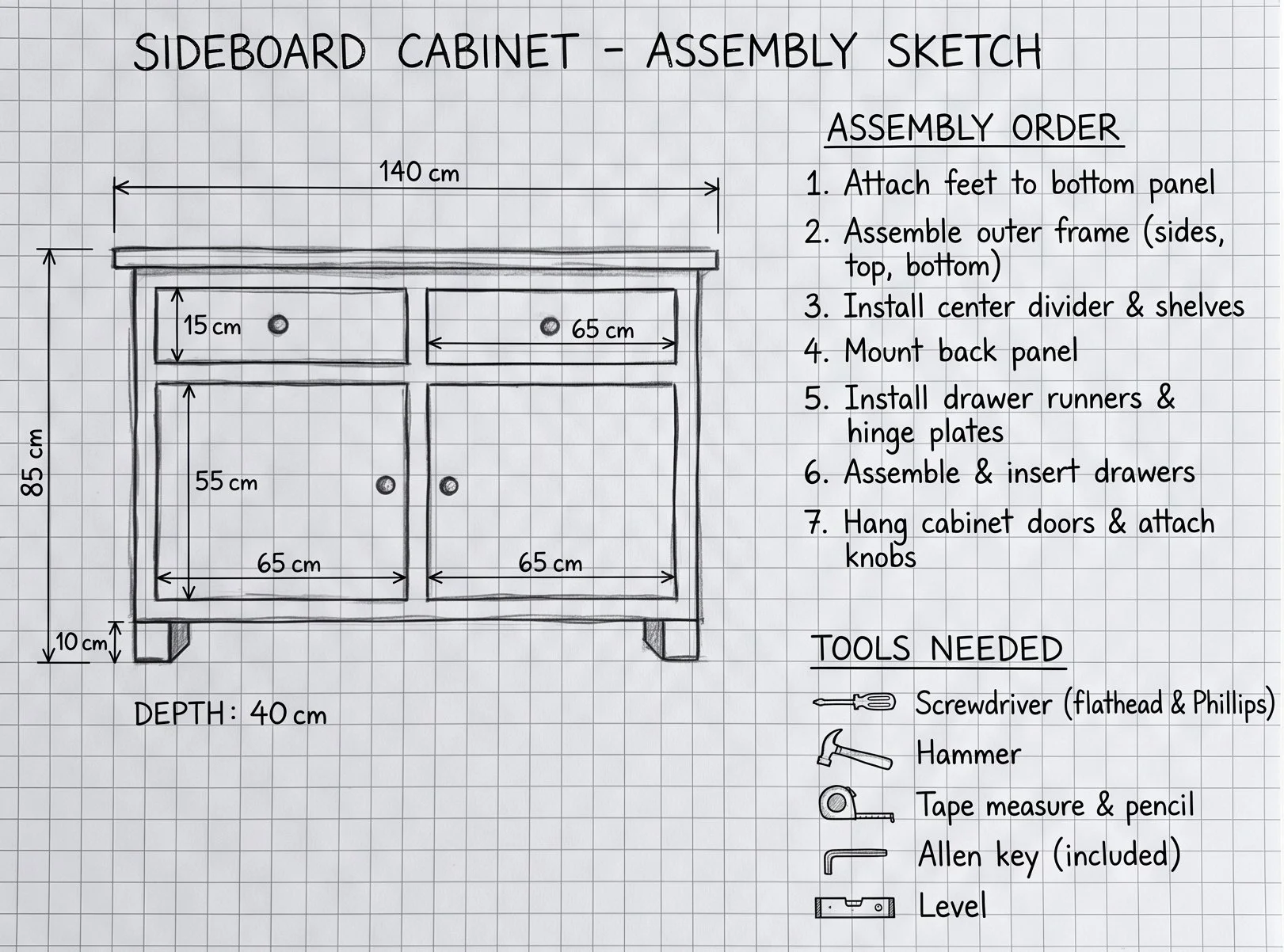
Here's the important bit. Treat an AI cut list as a first draft. AI is confident about numbers it hasn't checked. It can forget to take the side panels off a shelf width, miss the clearance a drawer runner needs, ignore the fact that your walls aren't square, or just get the arithmetic wrong. And one wrong number early tends to flow through to every panel after it.
That's not a reason to skip it. A draft cut list is a far better starting point than nothing. It just needs a second set of eyes, and that's exactly what happens at Cutshop®. Every cut list is read by a person who checks it against how the cabinet will actually fit together, before anything gets cut.
Try this prompt:
“I’m building [describe your design] from [thickness]mm board. The space is [W]mm wide, [H]mm high and [D]mm deep. List every panel I’ll need with its dimensions in millimetres and the quantity, then list the hardware. Show your working for each dimension and flag anything you’re unsure about.”
More ways to put AI to work
Get a measuring checklist. Tell it what you're building and ask what you need to measure. A laundry tower and a window seat need very different numbers.
Plan around your actual stuff. List what's going in it (5 pairs of shoes, two suitcases, the vacuum) and ask it to size the compartments. Then measure your tallest boots and biggest suitcase to check.
Ask what will annoy you in two years. AI makes a good devil's advocate. Open shelves that gather dust, push-to-open doors that toddlers love, a drawer that clashes with the door handle. Better to hear it now than after assembly.
Learn the lingo. Carcass, gable, scribe, kickboard. Ask it to explain the terms for your project, and the conversation at the counter moves a lot quicker.
Write your brief. Ask it to pull everything together (design, measurements, materials, who's assembling and when you need it by) into a one-page brief. Bring it in, or paste it straight into our quote form.
Note: Remember AI can make mistakes.
Where AI stops and Cutshop® starts
AI can't measure your room or see behind the plasterboard. It doesn't know which boards are available in New Zealand, or which suit a steamy bathroom better than a bedroom. Its price estimates are guesses, often based on overseas figures. And it will rarely tell you when it's unsure.
That's the part we're here for. Bring us your ideas, measurements, mockups and AI-drafted cut list, in whatever state they're in, to one of our factories in the North Shore, Mt Wellington or Hamilton. There's no appointment needed. Our team will go through it with you, check the numbers, and help you choose materials from real samples rather than a screen.
Your panels are then CNC-cut to your exact measurements, edge-banded and labelled so you know which piece goes where. Delivered anywhere in New Zealand, or pick up from your local Cutshop® factory. There's no minimum order, so a single shelf is just as welcome as a full kitchen. Can't get to a factory? Upload your measurements, sketches or mockups for a no-obligation quote, or call us on 0800 CUTSHOP.
Got an idea (or an AI mockup)?
See what’s possible with Cutshop®’s bespoke cabinetry: kitchens, laundries, vanities, wardrobes, offices, garage storage and custom furniture, cut to your exact dimensions with no minimum order. Send a sketch, a cutlist, a DXF file or your AI mockup for a quote, bring your measurements into your local factory, or call 0800 CUTSHOP.
